



Laragon Software is an essential tool for web developers, providing a local development environment to build and test websites and applications on computers without external hosting. The program combines multiple utilities to run projects and manage databases easily. In this article, we explore its benefits, uses, downloading, and installation.
What Is Laragon Software?
Laragon Software is a local development environment running on Windows systems, offering developers the tools needed to construct, build, and test websites on personal computers without uploading them to external web servers. The program gathers technologies like PHP, MySQL, Apache, and Nginx, enabling management through a single interface.
Simply put, web developers can create test versions of websites on their computers, experimenting with edits and functional features before deploying sites live on the internet.
What Is the Benefit of Laragon Software?
The importance of the software lies in streamlining web development workflows and reducing the time and effort needed to configure operating environments. Key benefits include:
- Running Websites Locally: Testing websites and web applications without requiring paid server hosting.
- Providing an Integrated Environment: Managing web servers, databases, and programming languages from one unified dashboard.
- Facilitating Edit Testing: Trying source code changes and updates prior to live deployment on production sites.
- Saving Time: Setting up development environments and launching projects through simple, quick steps.
- Easy Project Portability: Featuring a portable design that allows moving program folders between storage drives and computers.
- Managing Multiple Versions: Adding diverse versions of PHP and MySQL and switching between them based on project needs.
Uses of Laragon Software
Laragon Software is utilized across numerous tasks related to web development and digital systems, most notably:
- WordPress Site Development: Building WordPress sites locally and testing themes, plugins, and custom functions before public launch.
- E-Commerce Store Development: Constructing staging stores to test functional checkout processes, product layouts, and shopping carts.
- Building PHP Applications: Authoring source code and running web applications reliant on PHP execution.
- Database Management: Creating MySQL databases, managing data tables, and testing database connections.
- Website Testing: Identifying programming bugs and auditing updates without impacting live websites.
- Developing Business Management Systems: Creating initial prototypes for sales, accounting, and warehouse software, auditing system functions prior to deployment.
A vital highlight is that developers building sales software or ERP systems can utilize Laragon Software to set up local environments for testing software functions, such as product registration, inventory tracking, invoice issuance, and database connections before deploying systems for live commercial use.
How to Download Laragon Software
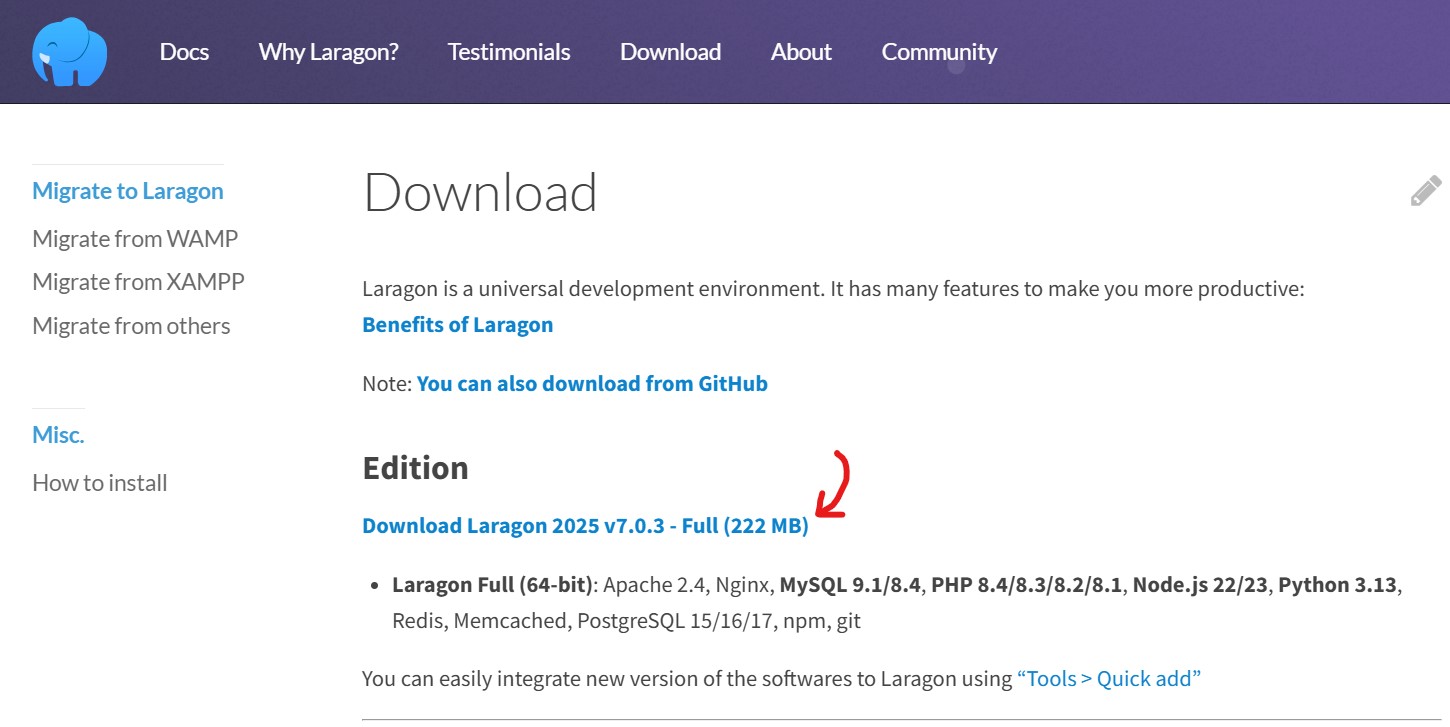
The software can be downloaded onto Windows computers via the official website or its software page on Uptodown:
Relying on the official site is recommended to get the latest release and review licensing terms prior to installation.
How to Install Laragon Software
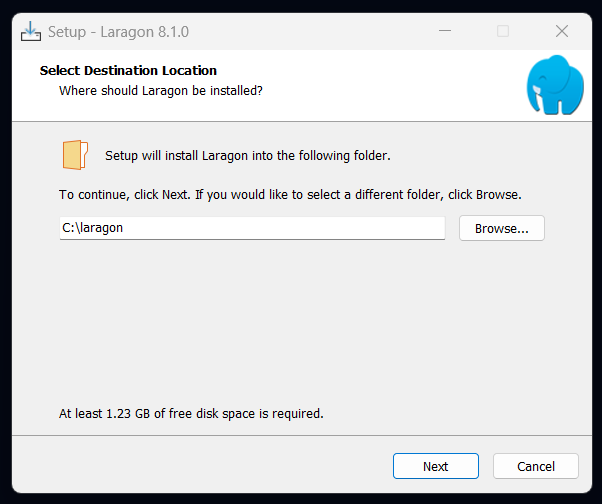
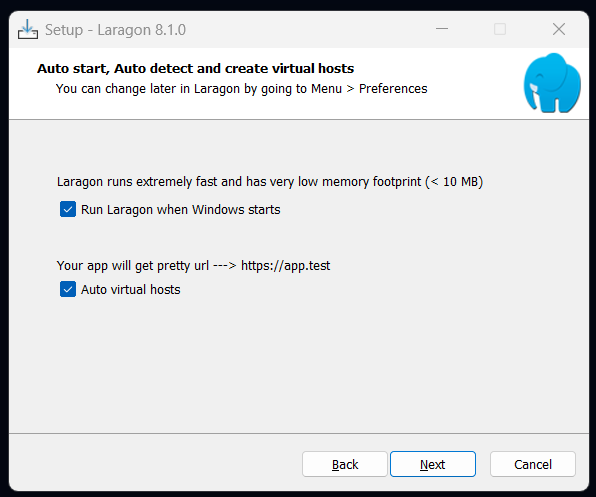
After downloading the executable EXE installation file, follow these steps:
- Open the downloaded installation file on your computer.
- Approve starting the installation process, then click Next.
- Select the destination folder where you wish to install the software, such as C:\laragon.
- Set execution preferences, such as launching Laragon Software automatically when Windows boots up, if needed.
- Enable the Auto Virtual Hosts option to generate local URLs for projects automatically.
- Click Install and wait until setup completes.
- Click Finish to launch Laragon Software.
How to Use Laragon Software After Installation
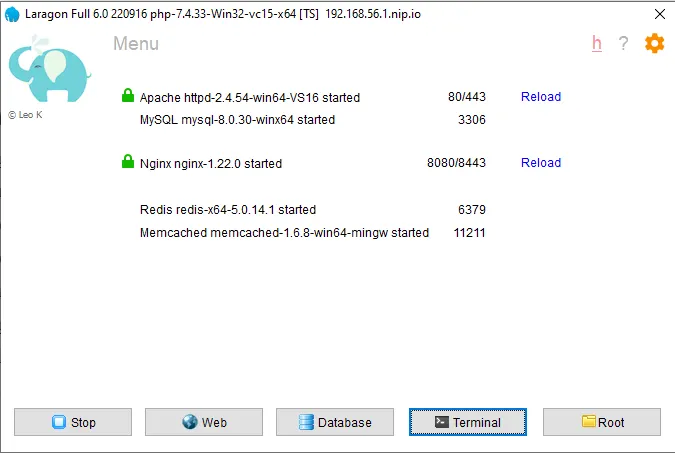
Following software installation, usage begins through these straightforward steps:
- Open Laragon Software from your desktop shortcut.
- Click the Start All button to launch web server and database services.
- Open the Menu bar to access available tools and configuration choices.
- Select Quick App to install new projects, such as WordPress sites.
- Enter your project name, and the software will prepare files and databases automatically.
- Open your project in a web browser using the local URL generated by the program.
For instance, when building a WordPress project named myapp, Laragon Software creates a database for the project, downloads WordPress core files into the project directory, and provides a local URL like http://myapp.test.
Pros and Cons of Laragon Software
Features to Appreciate
- Simple development environment setup
- Support for multiple programming technologies
- Rapid local project creation
- Straightforward database management
- Portable workspace file transferability
Points to Consider
- Requires baseline web development knowledge
- Tailored primarily for Windows operating systems
- Does not publish websites online automatically
- Demands suitable configuration per project
- Commercial usage requires paid licensing
Is Laragon Software Free?
The software is no longer entirely free starting from version 7.
According to official Laragon Software statements, unlicensed usage remains free for non-commercial purposes, displaying a licensing reminder popup upon launching the program or its services. Commercial usage demands a paid license, with the official website currently featuring version 8.8.0.
Al-Badr Sales Systems: Integrated Business Management Solutions
After understanding Laragon Software and its role in web development, application building, and pre-launch testing, selecting the right systems to manage commercial operations efficiently becomes paramount.
Al-Badr Smart Systems provides specialized software solutions for sales, inventory, and accounting, offering tools that help business owners monitor operations and organize daily workflows. You can explore Al-Badr sales systems through our website and discover solutions tailored to your business activities.
Laragon Software represents a practical choice for web developers needing integrated local environments to create and test websites and applications prior to public release. Its straightforward setup, execution, and tool management deliver convenient experiences for beginners and professionals alike, especially when engineering PHP and database-driven projects.