


Executing a purchase entry in Al-Badr Sales Pro simplifies stock management for suppliers, restaurants, cafes, supermarkets, grocery stores, apparel boutiques, and footwear shops. In this guide, we present a detailed walkthrough covering the steps required for Recording a New Purchase from a Supplier to keep your stock levels and accounts accurate.
How to Record a New Purchase from a Supplier
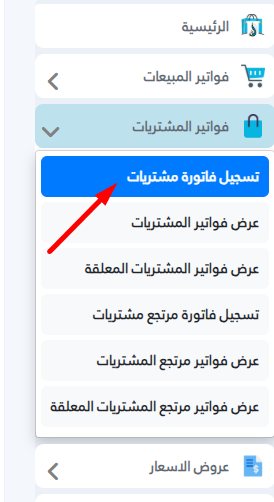
- From the main dashboard menu, select Purchase Invoices.
- Click Record Purchase Invoice.
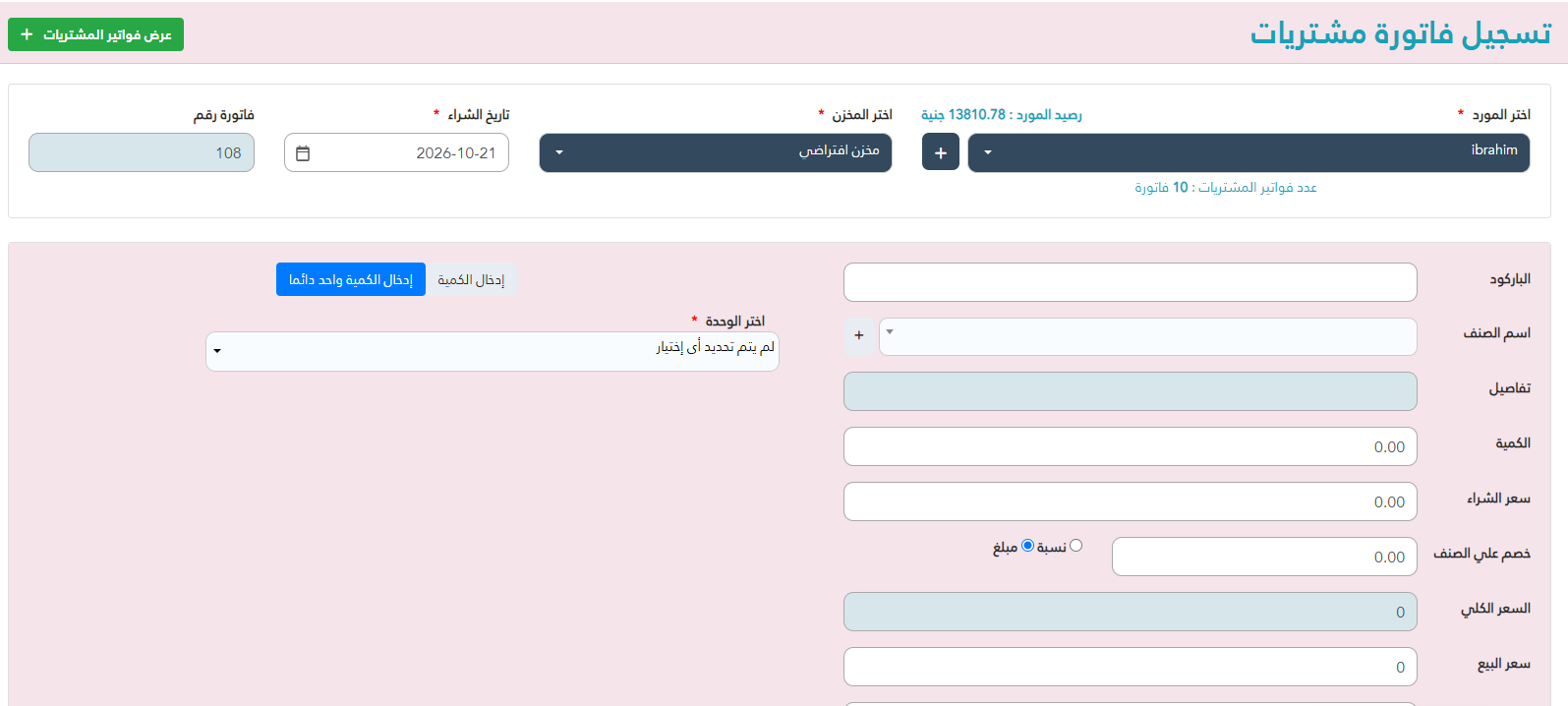
The system will display a new entry interface featuring a data entry form.
Input the required transaction fields: Supplier Name, Warehouse Location, Purchase Date, and Item Attributes.
After filling in all product details for an item, click the Add button.
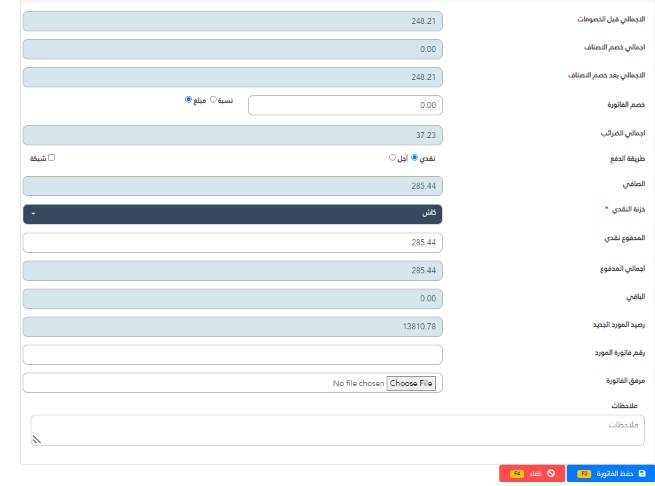
A new line entry will appear within the list displaying the recorded transaction details.

Specify the amount paid to the supplier. If the amount paid is less than the total required sum, the transaction registers as a credit purchase, deducting only the actual cash disbursed from the point-of-sale drawer. If the paid amount equals zero, the entire transaction becomes a credit entry, and no cash is deducted from the POS cash drawer.
Here we focus on cash versus credit transaction processing.
When selecting credit, the software automatically logs the remaining balance against the supplier account ledger.
Ensure you define the payment method before proceeding with the addition, as this determines whether the amount updates the registered account balance or processes as a cash disbursement.
Click Save.
A green notification banner will confirm that the transaction has been saved successfully and added to the purchase operations report.
Al-Badr Software for Managing Shop and Commercial Enterprise Sales
Monitor your commercial operations from anywhere with complete safety and ease through an all-in-one POS and e-commerce platform.
Key properties of Al-Badr Sales Pro and supplier management software include:
- Adding item details (item code, product title, unit price, stock quantity).
- Recording client and supplier master data.
- Documenting daily sales logs and purchase transactions.
- Logging external business revenues.
- Supporting electronic barcode scales.
- Supporting optical barcode readers.
- Displaying store stocktaking reports to verify physical inventory on hand.
- Generating comprehensive daily sales reports for the store.
- Triggering automated low-stock and item shortage alerts.
- Recording operating expenses.
- Printing detailed expense reports.
- Generating profit and loss balance reports.
- Tracking item movement and transaction history.
- Printing custom product barcode labels.
- Generating customer account debit and credit reports.
- Providing an online product catalog display page for your buyers.
- Logging employee profiles and processing salary disbursements.
- Displaying internal notification alerts for staff members.
- Integrated e-commerce website to showcase your products online.
- Online shopping cart functionality for digital customers.
- Tracking customer web orders within a unified system.
- Securing your data with absolute privacy and safety.
- Operating seamlessly across all operating systems (Windows, Linux, Apple).
- Database backup and restore capabilities.
- Supporting retail public sales and wholesale pricing tiers for designated accounts.
- Multi-user system environment with custom permission controls per user.
- Flexible data entry via manual item selection or barcode scanning.
- Running simultaneously across multiple devices in the store without buying extra software licenses per terminal.
- Remote platform accessibility via desktop computers, laptops, or mobile smartphones.
- Protecting your commercial data and daily financial transactions in complete confidentiality.
Try the software for free here
For more videos, click here