Educational lessons

pos sales assistant (Cashier)
Last updates

Al Badr point of sales software POS for pos sales assistant (Cashier)

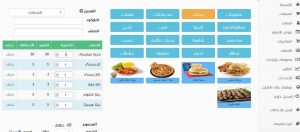
The cashier is the in charge employee for registering sales invoices and collecting money from customers. “Al Badr Program for Sales” helps the cashier to register by using the barcode easily or by choosing from the products list as soon as he types the first litters of this product, all the corresponding products to this name will appear. Thus, he can choose the desired product, register its total payment value and the change, then it’s added to the customer’s account.

Improve Browser Print Settings
Lesson Library

How to improve the browser printing settings in “Al Badr point of sales software POS”

Printing the invoices is one important feature of “Al Badr Program for Sales” where you can print the invoices of your deals and give the customers an image of them, the invoices printing process depends on the browser you use as “Firefox” or “Google Chrome”, so to improve the printing quality, you must adjust the settings of the browser so that the printing will appear with the required sizes such as margins or the date printing settings at the browser.

Successful Cashier Sales invoice design Electronic invoices
Last updates

The new business plan update in “Al Badr point of sales software POS”

Now… for all the customers of “Al Badr Program for Sales”, we have provided our customers with a new business plan which aims to serve your business and activity in addition to marketing your products. “Al Badr Smart Systems” company aims to serve its customers by offering services that facilitate their business and increase their activity. Hence, a new system has been put to provide those customers with all the new features of the program in addition to offering new services that are available in “Al Badr Program for Sales” only and for the first time ever.