


Adding a new expense category in Al-Badr Daily Sales Software is simple and helps you accurately track business expenses for better financial reporting.
Steps to Add a New Expense Item
- From the Main Dashboard, click on the Expenses icon.
- Select Expense Categories.
- A new page will appear showing the list of existing expense items in a table format.
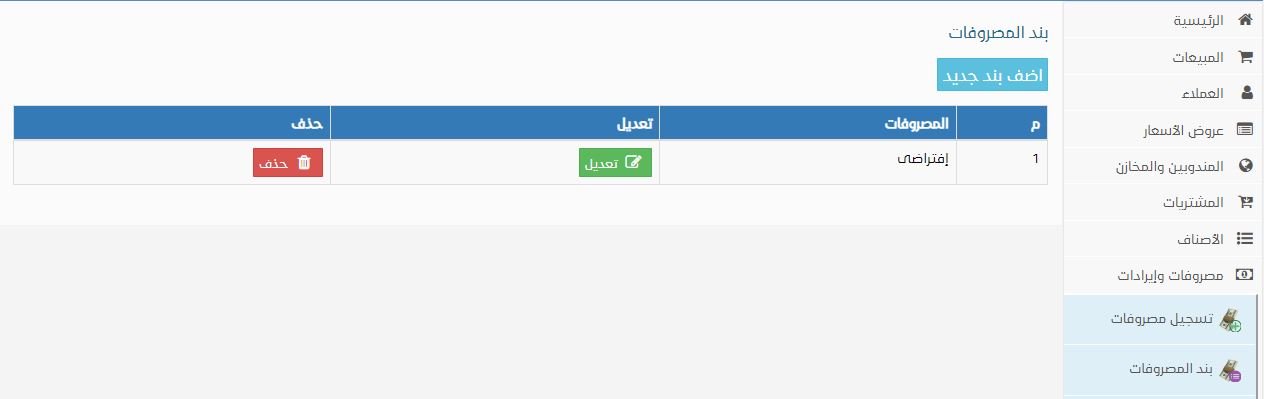
- Click on the Add New Item button.
- A dialog box will appear.
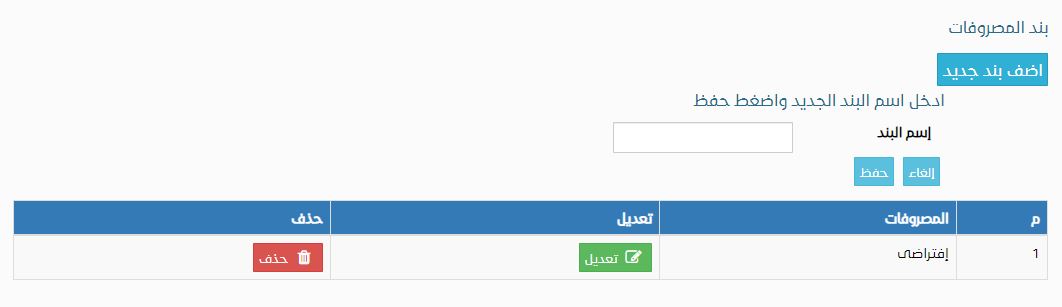
- Enter the name of the new expense category.
- Click Save.
The expense item will now be successfully added and ready for use.
Core Features of Al-Badr POS & Accounting System
The system includes a wide range of features to help you manage daily sales, expenses, and inventory efficiently:
- Add product details (Code – Product Name – Price – Quantity)
- View store inventory and available stock quantities
- Record daily sales and purchases
- Generate daily sales reports
- Automatic invoice total and discount calculation (no calculator needed)
- Low stock alerts
- Record business expenses
- Print expense reports
- Profit and loss reports
- Record external income
- Product movement reports
- Barcode scanner support
- Print product barcodes
- Barcode scale support
- Customer data management
- Online product display page for your customers
- Customer account statements (debit & credit)
- Employee management and payroll recording
- Employee notifications
- Touch-screen product registration
Key Advantages of the Software
- Secure and private data storage
- Full confidentiality of business transactions
- Works on any operating system (Windows / Linux / macOS)
- Easy to use and simple to learn
- No installation required
- No issues with operating system updates or reinstallation
- Database backup capability
- Manual or barcode-based product entry
- Retail and wholesale sales modes
- Multi-user system with customizable permissions
- Run on multiple devices within the store without purchasing additional copies
- Easy system updates through our website
- Accessible via desktop, laptop, or mobile device
Try the program for free here. Watch a video tutorial for the program here.